Whole-team scan
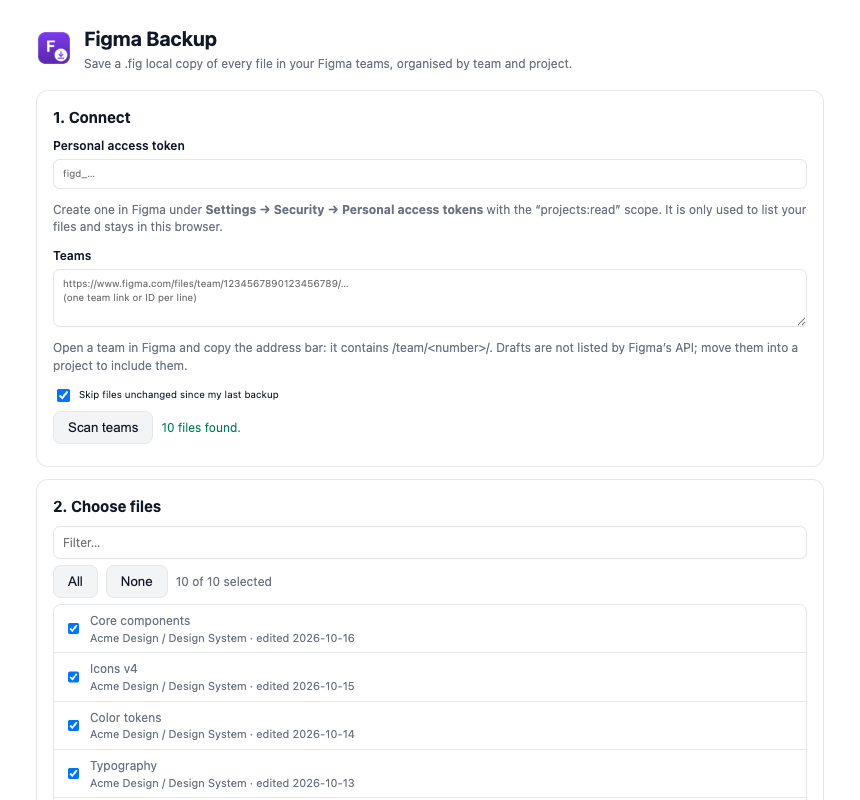
Add your team links and see every project and file, with last-edited dates.
 Figma Backup
Coming soon to the Chrome Web Store
Figma Backup
Coming soon to the Chrome Web Store
Figma saves local copies one file at a time. Figma Backup does whole teams: every design, FigJam and Slides file, saved as .fig and organised by team and project.
Version history lives inside Figma. When a file is deleted by mistake, a teammate leaves or you switch tools, .fig files on your own disk are the copy that still opens. Making them by hand means opening every file, one at a time.
Add your team links and see every project and file, with last-edited dates.
Files land in Downloads/Figma Backup/<team>/<project>/, named with their file key.
Next time, only files edited since your last backup are saved again.
Stop any time. Files already saved are kept and the rest wait for you.
Files that could not be saved are listed with the reason, never skipped silently.
Your token and your files never touch our servers.
In Figma: Settings → Security → Personal access tokens, with the read-only “projects:read” scope.
Paste your team links (they contain /team/<number>/) and pick the files to back up.
Each file opens in a separate window and Figma’s own “Save local copy…” saves it. Keep the backup tab open.
Backups mirror your Figma structure, so finding a file later takes seconds.
Downloads/Figma Backup/
└── Acme Design/
    ├── Design System/
    │   ├── Core components (KEYAAA111).fig
    │   ├── Icons v4 (KEYBBB222).fig
    │   └── Color tokens (KEYCCC333).fig
    ├── Mobile App/
    │   └── Checkout redesign (KEYDDD444).fig
    └── Marketing Site/
└── Homepage 2026 (KEYEEE555).figSaving “Icons v4” (2 of 10)… Done: 9 saved, 1 failed. Files are in your Downloads folder under “Figma Backup”. Not saved • Brand guidelines — “Save local copy…” is disabled for this file (view-only access).
Figma Backup runs entirely inside Chrome. Data goes from the service you already use straight to your own computer.
Only the read-only projects:read scope, used to list your projects and files. The token is stored in your browser and sent only to Figma.
Figma’s API does not list drafts. Move drafts into a project to include them in the backup.
Figma offers “Save local copy…” only when your access allows copying. Files where it is unavailable are listed as not saved.
Figma may limit how many local copies can be saved in a short time. After three failures in a row the backup pauses; resume later and it continues where it stopped.
Yes, Figma Backup is free during launch.
No. Figma Backup is an independent tool and is not affiliated with, endorsed by or sponsored by Figma. Figma is a trademark of Figma, Inc.
Email support@topgear7.com and tell us what you clicked and what you saw.
Every .fig file, safely backed up. Free during launch.
Coming soon to the Chrome Web Store